Computer Classes Course
COMPUTER CLASSES COURSE OVERVIEW
Computer classes course “Unlock your potential with our comprehensive computer classes! Dive into the world of productivity with MS Office, master the art of data manipulation with Excel, streamline your financial processes with Tally, and enhance your typing skills for efficient communication. Join us to gain essential skills and boost your professional competence. Empower yourself with the tools that matter in today’s digital landscape.”
Computer classes course can cover a wide range of topics depending on the level and focus of the course. Here are some common types of computer classes:
Basic Computer Skills: These classes are for beginners and cover fundamental skills such as using a keyboard and mouse, navigating the operating system (e.g., Windows, macOS), managing files and folders, and basic troubleshooting.
Microsoft Office Suite: Courses focusing on Microsoft Office applications like Word, Excel, PowerPoint, and Outlook. They teach how to create documents, spreadsheets, presentations, and manage emails efficiently.
Programming: Classes on programming languages such as Python, Java, C++, and JavaScript. These courses teach the basics of coding, algorithm design, and problem-solving techniques.
Web Development: Covering HTML, CSS, JavaScript, and other technologies used to build websites. Students learn how to create and design web pages, as well as add interactivity and functionality.
Graphic Design and Multimedia: Classes that teach design software like Adobe Photoshop, Illustrator, and InDesign. Students learn how to create graphics, logos, digital illustrations, and layouts for print or web.
Database Management: Courses on database concepts, SQL (Structured Query Language), and database management systems like MySQL, Oracle, or Microsoft SQL Server.
Networking and Cybersecurity: Classes covering topics such as network fundamentals, network security, ethical hacking, and cybersecurity best practices.
Digital Marketing: Courses on online marketing strategies, including social media marketing, search engine optimization (SEO), email marketing, and analytics tools.
Computer Hardware: Classes focusing on understanding computer components, troubleshooting hardware issues, and basic computer assembly and maintenance.
Operating Systems: In-depth courses on operating systems like Linux, Windows, or macOS, covering topics such as system administration, security, and advanced features.
These are just a few examples, and there are many other specialized Computer classes course available depending on specific interests and career goals. Many classes are available online through platforms like Coursera, Udemy, and edX, while others are offered by local community colleges, universities, or vocational schools.
In het brede aanbod van de Nederlandse online gokmarkt onderscheidt casino unique zich met een eigen toon. E-mailaanvragen worden in de regel binnen 24 uur verwerkt. Het persoonlijke dashboard bundelt speelhistorie, bonusoverzicht en saldo op één plek. Speelsessies kunnen naadloos tussen desktop en smartphone worden voortgezet. Sofort-betaaldiensten zoals Trustly of Klarna zijn eveneens in het betalingsportfolio opgenomen. Speciale formats zoals Speed Roulette versnellen het spelverloop voor ongeduldige spelers. Een demo-functie maakt het mogelijk spellen uit te proberen zonder financieel risico. Aanbiedingen voor preventie van gokverslaving worden direct in het account beschikbaar gesteld. Een interne shop maakt het inwisselen van loyaliteitspunten tegen reële prijzen mogelijk. In totaal laat het platform een volwassen en coherente indruk achter.
Lorem ipsum dolor sit amet, consectetur adipiscing elit. Ut elit tellus, luctus nec ullamcorper mattis, pulvinar dapibus leo.Lorem ipsum dolor sit amet consectetur adipiscing elit dolor
John Doe Tweet
CURRICULUM
- Introduction to Computers: Basic hardware, software, and operating systems.
- Computer Basics: Keyboarding, mouse skills, and troubleshooting.
- Word Processing: Using software like Microsoft Word for document creation.
- Spreadsheets: Using software like Microsoft Excel for data organization and analysis.
- Presentation Software: Creating slideshows with software like Microsoft PowerPoint.
- Internet Basics: Web browsing, search engines, and online safety.
- Email and Communication: Using email accounts and understanding online etiquette.
- Digital Citizenship: Cybersecurity, online behavior, and avoiding scams.
- Programming (optional): Introduction to coding languages and basic programming concepts.
- Hardware and Maintenance (optional): Understanding computer components and basic troubleshooting.
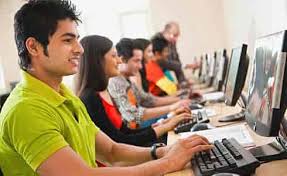
Computer classes
- Instructor : Eleanor Fant
- Lectures :14
- Enrolled :20 students
- Duration :6 weeks
- Language :English